Shantanu's Blog
Database ConsultantSeptember 18, 2020
Remove junk from pandas dataframe
Non-latin unicode characters in pandas dataframe are a big problem. Several hours are lost cleaning the data when some obscure characters are found in the dataframe imported from the csv or excel file. Here is an easy solution...
from unicodedata import normalize
def clean_normalize_whitespace(x):
if isinstance(x, str):
return normalize('NFKC', x).strip()
else:
return x
df_GDP = df_GDP.applymap(clean_normalize_whitespace)
#clean column headings as well
df_GDP.columns = df_GDP.columns.to_series().apply(clean_normalize_whitespace)
I have used NFKC parameter that stands for Normal Form Kompatibility Composition. The other one is NFKD (Decompostion) along with NFD as well as NFC.
https://unicode.org/reports/tr15/#Norm_Forms


August 09, 2015
Using the same character sets across all tables
The default character set used per database are listed using this query...
mysql> select * from information_schema.SCHEMATA;
+--------------+--------------------+----------------------------+------------------------+----------+
| CATALOG_NAME | SCHEMA_NAME | DEFAULT_CHARACTER_SET_NAME | DEFAULT_COLLATION_NAME | SQL_PATH |
+--------------+--------------------+----------------------------+------------------------+----------+
| def | information_schema | utf8 | utf8_general_ci | NULL |
| def | emailplatform | latin1 | latin1_swedish_ci | NULL |
| def | mysql | latin1 | latin1_swedish_ci | NULL |
| def | performance_schema | utf8 | utf8_general_ci | NULL |
| def | test | latin1 | latin1_swedish_ci | NULL |
| def | test1 | latin1 | latin1_swedish_ci | NULL |
+--------------+--------------------+----------------------------+------------------------+----------+
6 rows in set (0.01 sec)
If some of the tables from a database does not match with with other tables, we need to alter those tables. for e.g. if 1 or 2 tables from test database are using utf8 encoding, then the best choice is to drop and recreate those tables as latin1
There are 2 points to note here...
1) The table in question should not be part of foregin key relations.
2) The table should not actually contain unicode characters. Because once we convert it to latin1, there will be no way to store unicode.
The easiest way to check if the tables from a given database are using different character set is to use mysqldump command as shown here...
root@ip-10-86-106-75:/home/ubuntu# mysqldump test --no-data | grep ENGINE
) ENGINE=TokuDB DEFAULT CHARSET=latin1;
) ENGINE=InnoDB DEFAULT CHARSET=utf8;
) ENGINE=TokuDB DEFAULT CHARSET=latin1;
This means there are a few tables with utf8 character while others are latin1.
You will have issues while joining a latin1 table with utf8 table. The query will not use indexes if the columns are of different character sets.
_____
The following query run on "information_schema" database shows that there is 1 table in test database that has utf8 collation. All other tables in test database are latin1. Therefore I need to change that single utf8 table to latin1
# create a new table in test database
create table test.tables select * from information_schema.tables;
# check for table_collations
mysql> select table_schema, table_collation, count(*) as cnt from test.tables group by table_schema, table_collation;
+--------------------+-------------------+-----+
| table_schema | table_collation | cnt |
+--------------------+-------------------+-----+
| emailplatform | latin1_swedish_ci | 64 |
| information_schema | utf8_general_ci | 45 |
| mysql | latin1_swedish_ci | 1 |
| mysql | utf8_bin | 8 |
| mysql | utf8_general_ci | 15 |
| performance_schema | utf8_general_ci | 17 |
| test | latin1_swedish_ci | 18 |
| test | utf8_general_ci | 1 |
| test1 | latin1_swedish_ci | 1 |
+--------------------+-------------------+-----+
9 rows in set (0.00 sec)
To find the name of the table I use this query:
mysql> select table_name from tables where table_schema = 'test' and table_collation like 'utf8%';
+------------+
| table_name |
+------------+
| cdr_master |
+------------+
1 row in set (0.01 sec)
And here is the count:
mysql> select count(*) from test.cdr_master;
+----------+
| count(*) |
+----------+
| 186166 |
+----------+
1 row in set (0.04 sec)
This is relatively small table so we can quickly change the character set.
But we need to check that there is no other table linked to this using foreign key relations.
mysql> select * from information_schema.KEY_COLUMN_USAGE where TABLE_SCHEMA='TEST' AND TABLE_NAME = 'cdr_master' LIMIT 1\G
Empty set (0.00 sec)
mysql> select * from information_schema.KEY_COLUMN_USAGE where REFERENCED_TABLE_SCHEMA='TEST' AND REFERENCED_TABLE_NAME = 'cdr_master' LIMIT 1\G
Empty set (0.06 sec)
_____
To change the default character set we need to drop and recreate the table.
Take the backup of the table.
# mysqldump --tab=/tmp/ test cdr_master
Change the character set:
# sed -i.bak 's/CHARSET=utf8/CHARSET=latin1/' /tmp/cdr_master.sql
Recreate the new table after dropping the old one:
# mysql test < /tmp/cdr_master.sql
# restore data:
mysql> load data infile '/tmp/cdr_master.txt' into table test.cdr_master;
Query OK, 186166 rows affected (25.06 sec)
Records: 186166 Deleted: 0 Skipped: 0 Warnings: 0
Now log-out and log back in to find that all the tables in test database are having the same table_collation.
mysql> select table_collation, count(*) as cnt from information_schema.tables where table_schema = 'test' group by table_collation;
+-------------------+-----+
| table_collation | cnt |
+-------------------+-----+
| latin1_swedish_ci | 19 |
+-------------------+-----+
1 row in set (0.00 sec)
_____
In order to check if the utf8 encoded table really has any unicode characters, you need to take the backup of the table.
mysqldump test tbl_name > todel.txt
And then run this python script. If the script processes all the lines without any problem then the data is compatible with latin1.
import codecs
f = codecs.open("/tmp/todel.txt", "r", "utf-8")
for line in f.readlines():
todel=line.decode('latin1')
You have unicode data in your table if you get an unicode error like this...
UnicodeEncodeError: 'ascii' codec can't encode characters in position 31-35: ordinal not in range(128)
In such case, you can not continue with the task of table re-creation unless you decide to ignore the unicode characters being
_____
If you want to check which lines contain unicode characters, you need another type of dump (skip extended insert option will generate a line per record in the table)
# mysqldump test todel --skip-extended-insert > todel.txt
And the following python code will display all the records where unicode characters are used.
import codecs
f = codecs.open("/tmp/todel.txt", "r", "utf-8")
for line in f.readlines():
try:
todel=line.decode('latin1')
except:
print line
_____
If recreating the entire table is not an option, then simply change the single column to latin1.
mysql> alter table test.cdr_master modify column call_uuid varchar(50) charset latin1;
This will make the query very fast if the column "call_uuid" is used in the join query. The other table's column "call_uuid" should be also latin1.
_____
if you use extended explain then you will see what mysql is trying to do internally.
mysql> explain extended select * from a inner join b on a.column = b.column
mysql> show warnings;
The warning will show that mysql is trying to convert the b.column from utf8 to latin1 in order to match with a.column. This internal conversion will not allow mysql to use indexes.
Labels: mysql tips, python, unicode
December 17, 2014
Working with unicode strings in mysql
You will get an error as shown below:
drop table todel;
create table todel (name varchar(100)) DEFAULT CHARSET=latin1;
insert into todel values ('हिदी' )
Error in query (1366): Incorrect string value: '\xE0\xA4\xB9\xE0\xA4\xBF...' for column 'name' at row 1
insert into todel values (convert ('हिदी' using binary));
select convert(convert(name using binary) using utf8) from todel;
The work-around is to store the record as binary and while selecting, use convert function twice as shown above.
_____
There is a better way though. Why not to use utf8 encoding for the entire table?
drop table todel;
create table todel (name varchar(100)) DEFAULT CHARSET=utf8;
insert into todel values ('हिदी' );
select * from todel;
_____
You think that altering the table to utf8 will solve this issue?
alter table todel default charset=utf8;
No. Because even if the default table type is now utf8, the columns are still latin1
mysql> show create table todel;
+-------+---------------------------------------------------------------------------------------------------------------------+
| Table | Create Table |
+-------+---------------------------------------------------------------------------------------------------------------------+
| todel | CREATE TABLE `todel` (
`name` varchar(100) CHARACTER SET latin1 DEFAULT NULL
) ENGINE=InnoDB DEFAULT CHARSET=utf8 |
+-------+---------------------------------------------------------------------------------------------------------------------+
1 row in set (0.00 sec)
alter table todel modify name varchar(100) character set utf8 ;
Now even if we have column as well as table type utf8, we still get junk characters instead of unicode.
mysql> select * from todel;
+---------------------------+
| name |
+---------------------------+
| हिदी |
+---------------------------+
1 row in set (0.00 sec)
The bad news is that the convert query that was working fine earlier has now stopped working as expected.
mysql> select convert(convert(name using binary) using utf8) from todel;
+------------------------------------------------+
| convert(convert(name using binary) using utf8) |
+------------------------------------------------+
| हिदी |
+------------------------------------------------+
1 row in set (0.00 sec)
The unicode data is lost in the conversion.
_____
So the correct solution would be to add a utf8 column to latin1 table and update that column data with correct unicode string.
Let's start all over again:
drop table todel;
create table todel (name varchar(100)) DEFAULT CHARSET=latin1;
insert into todel values (convert ('हिदी' using binary));
select convert(convert(name using binary) using utf8) from todel;
alter table todel add column hindi varchar(100) character set utf8;
update todel set hindi = convert(convert(name using binary) using utf8) ;
mysql> select convert(convert(name using binary) using utf8), hindi from todel;
+------------------------------------------------+--------------+
| convert(convert(name using binary) using utf8) | hindi |
+------------------------------------------------+--------------+
| हिदी | हिदी |
+------------------------------------------------+--------------+
1 row in set (0.00 sec)
_____
Now the problem is that the application is not aware of this new column called "hindi" and it is still using column "name". We need an insert and update trigger to keep correcting the values in the hindi column. Something like this...
delimiter |
CREATE TRIGGER todel_bi after INSERT ON todel
FOR EACH ROW
BEGIN
UPDATE todel SET hindi = convert(convert(name using binary) using utf8) WHERE id = NEW.id;
END;
|
insert into todel (id, name) values (2, (convert ('मराठी' using binary)));
I thought the after insert trigger would solve this issue, but I get an error.
ERROR 1442 (HY000): Can't update table in trigger because it is already used by statement which invoked this stored function/trigger.
Now I need to write a stored procedure that inserts the record in the target table and change the code accordingly (that will call the procedure).
_____
So we are back where we started. Why not simply replace the name column with this new unicode aware column?
drop table todel;
create table todel (name varchar(100)) DEFAULT CHARSET=latin1;
insert into todel values (convert ('हिदी' using binary));
alter table todel add column hindi varchar(100) character set utf8;
update todel set hindi = convert(convert(name using binary) using utf8) ;
alter table todel drop column name;
alter table todel change column hindi name varchar(100) character set utf8;
December 13, 2012
Drupal site in 4 clicks
1) Log in aws console and go to CloudFormation Management Console. Click on "Create Stack" button.


2) admin/ admin is the default DB user name and password. You can specify the instance type (for e.g. m1.small)


Within a few minutes the site is ready!
This however, does not give you shell access to the ec2 instance. You need to create the drupal site based on a template in order to gain the root access.
http://aws.amazon.com/cloudformation/aws-cloudformation-templates/
Use the template that says: "Single EC2 Instance with local MySQL database"
You will be allowed to specify the kye pair that can be used to connect to the ec2.
This applies to Drupal, Joomla, Wordpress etc. Amazon ec2 instances are a bit costlier than the shared hosting. But I think aws is a good choice considering the host of features offered, reliability, support and brand.
Labels: aws, drupal, mysql, php, unicode, usability
December 11, 2012
unicode in python
Python has excellent support for unicode.
Here is how we can declare the string to be utf8
#!/usr/bin/env python
# -*- coding: utf8 -*-
print unicode("私","UTF-8")
a = unicode("प्रभाकर", "UTF-8")
b = u"प्रभाकर"
print len(b)
September 11, 2008
Unicode support in Knoppix 5.1

Knoppix Live CD has an excellent support for Unicode. It means it works with all languages in the world including Indian Languages and not just English. Here are the steps one needs to follow in order to use this CD.
1) Make sure you have Knoppix version 5.1.1 Live CD with you.
2) Insert the CD in the CD drive and start your computer.
3) If the computer starts in Windows then you have to hit F11 next time when you boot and change the boot sequence with "CD drive" as the first boot option.
4) Once you have started your computer in Knoppix environment, right click on the hard drive icon found on the desktop and choose the option "make the disk writable"
5) Now right click on the "US" flag on the task bar near the system clock.
6) Choose "India" in the country list and choose "Add". Click on apply, Ok.

7) Start open office writer and start typing in Devnagari. You can also save the document in .odf format since we have made the disk writable as explained in the step 4 above.
8) Restart the computer and remove the CD from the CD drive. Let the computer start in Windows. You can now open the .odf file that you have saved on the hard drive.
That's it. Enjoy.

October 11, 2007
Spell Check in Indian Languages
Spell check would have no meaning if there were no standards put in place. Unicode has standardized the Indian languages scripts and hence it's possible!
2) Open Source software : Firefox, Open Office and Hunspell
Hunspell is an engine that powers language spell checking in firefox and open office. All of these softwares / tools are free and open source. Thus anyone can use it as well as contribute to it.
3) User participation:
The driving force behind open source is user participation. They must be looking at the bigger picture and spending their own time and money for the betterment of their language and people.
4) Spell Check in Hindi, Marathi and other languages:
There are two main components that the work needs to be concentrated.
a) Building open source words list.
b) Integrating it with applications.
Once you have the words list, it can be made available as Hunspell engine. Firefox and open office, both can install any hunspell compatible spell checker. The advantage of this new format is that it can integrate suffix, affix and many other formats like "sounds like". This effectively will help us to build the comprehensive dictionary that will work better than the current default English dictionary that most of us have got used to!
The complete presentation is online at...
http://www.slideshare.net/shantanuo/spell-check-in-indian-languages
here are steps how to integrate it with firefox...
http://www.flickr.com/photos/shantanuo/351731580/
And here are the steps how to integrate it with Open office...
http://oksoft.blogspot.com/2006/10/marathi-spell-check-within-your-word.html
Labels: firefox, open office, unicode
April 19, 2007
Drupal localization
1) Administer - Site Building - Modules - enable "Locale" module

2) Administer - Site Configuration - Localization - Add Language - Marathi
3) Administer - Site Configuration - Localization - Import - Browse...
Select the mr.po file that you have downloaded and unzipped from
http://ftp.osuosl.org/pub/drupal/files/projects/mr-5.x-1.0.tar.gz
Right click the above link and choose "Save as..."

4) Enable Marathi and make it default interface.

5) To enable typing in Devnagari, download and unzip the file from...
http://ftp.osuosl.org/pub/drupal/files/projects/unisaraswati-5.x-1.0.tar.gz
Copy the unisarawati folder in the modules folder under drupal directory. Enable the module by navigating to Administer - Site Building - Modules. Decide where should be the Devnagari / Roman option should be displayed by going to Administer - Blocks. You can use the F12 key to toggle the input method from Devnagari to Roman.
Labels: drupal, unicode, usability
March 13, 2007
Hindi Spell Check in Google docs
http://tinyurl.com/2oxfkr
and check this example page when it's published using google docs.
http://docs.google.com/Doc?id=dddjxz53_7dr59jr
Labels: unicode
March 09, 2007
Blogger supports hindi
http://tinyurl.com/28j7g4
January 12, 2007
Unicode Transliteration
http://uni.medhas.org/girgit.php5
And you can convert the script to and from any Language to Devnagari and vice a versa. For e.g. manogat.com which is one of the very popular Marathi websites can be read in Gujarati script like this...
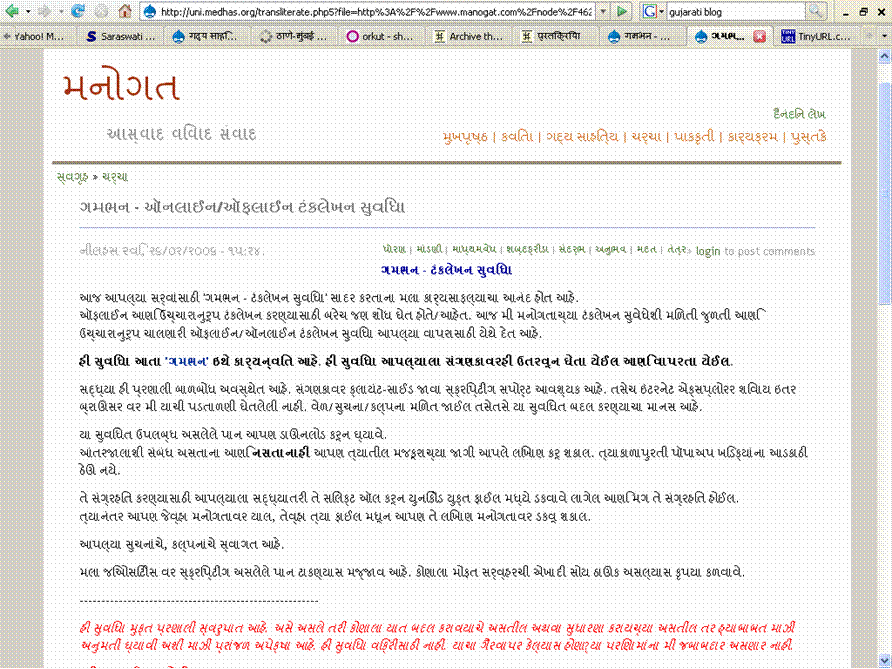
If you can't see Indian language script, Click on View - Character Encoding - Unicode (UTF-8)
A gujarati Blog can be read in Devnagari as shown in the following screen shot.
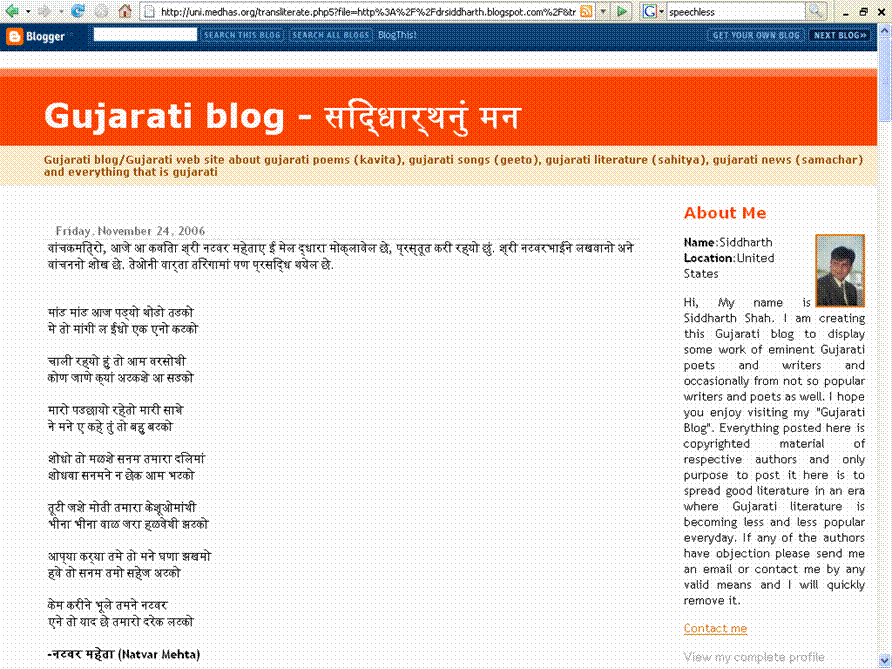
Now what's the problem if I want to read and try to understand the Tamil words from Tamil Wikipedia?

Bookmarklet
Click and drag the following link to the "Links Toolbar".
transliterate < /br>
If you want to read the non-unicode page in unicode format, use the following bookmarklet.
unicodify
Change the script from any Indian language to devnagari
Labels: unicode
Archives
June 2001 July 2001 January 2003 May 2003 September 2003 October 2003 December 2003 January 2004 February 2004 March 2004 April 2004 May 2004 June 2004 July 2004 August 2004 September 2004 October 2004 November 2004 December 2004 January 2005 February 2005 March 2005 April 2005 May 2005 June 2005 July 2005 August 2005 September 2005 October 2005 November 2005 December 2005 January 2006 February 2006 March 2006 April 2006 May 2006 June 2006 July 2006 August 2006 September 2006 October 2006 November 2006 December 2006 January 2007 February 2007 March 2007 April 2007 June 2007 July 2007 August 2007 September 2007 October 2007 November 2007 December 2007 January 2008 February 2008 March 2008 April 2008 July 2008 August 2008 September 2008 October 2008 November 2008 December 2008 January 2009 February 2009 March 2009 April 2009 May 2009 June 2009 July 2009 August 2009 September 2009 October 2009 November 2009 December 2009 January 2010 February 2010 March 2010 April 2010 May 2010 June 2010 July 2010 August 2010 September 2010 October 2010 November 2010 December 2010 January 2011 February 2011 March 2011 April 2011 May 2011 June 2011 July 2011 August 2011 September 2011 October 2011 November 2011 December 2011 January 2012 February 2012 March 2012 April 2012 May 2012 June 2012 July 2012 August 2012 October 2012 November 2012 December 2012 January 2013 February 2013 March 2013 April 2013 May 2013 June 2013 July 2013 September 2013 October 2013 January 2014 March 2014 April 2014 May 2014 July 2014 August 2014 September 2014 October 2014 November 2014 December 2014 January 2015 February 2015 March 2015 April 2015 May 2015 June 2015 July 2015 August 2015 September 2015 January 2016 February 2016 March 2016 April 2016 May 2016 June 2016 July 2016 August 2016 September 2016 October 2016 November 2016 December 2016 January 2017 February 2017 April 2017 May 2017 June 2017 July 2017 August 2017 September 2017 October 2017 November 2017 December 2017 February 2018 March 2018 April 2018 May 2018 June 2018 July 2018 August 2018 September 2018 October 2018 November 2018 December 2018 January 2019 February 2019 March 2019 April 2019 May 2019 July 2019 August 2019 September 2019 October 2019 November 2019 December 2019 January 2020 February 2020 March 2020 April 2020 May 2020 July 2020 August 2020 September 2020 October 2020 December 2020 January 2021 April 2021 May 2021 July 2021 September 2021 March 2022 October 2022 November 2022 March 2023 April 2023 July 2023 September 2023 October 2023 November 2023 April 2024 May 2024 June 2024 August 2024 September 2024 October 2024 November 2024 December 2024 January 2025 February 2025 April 2025 June 2025 July 2025 August 2025 November 2025 March 2026 July 2026
